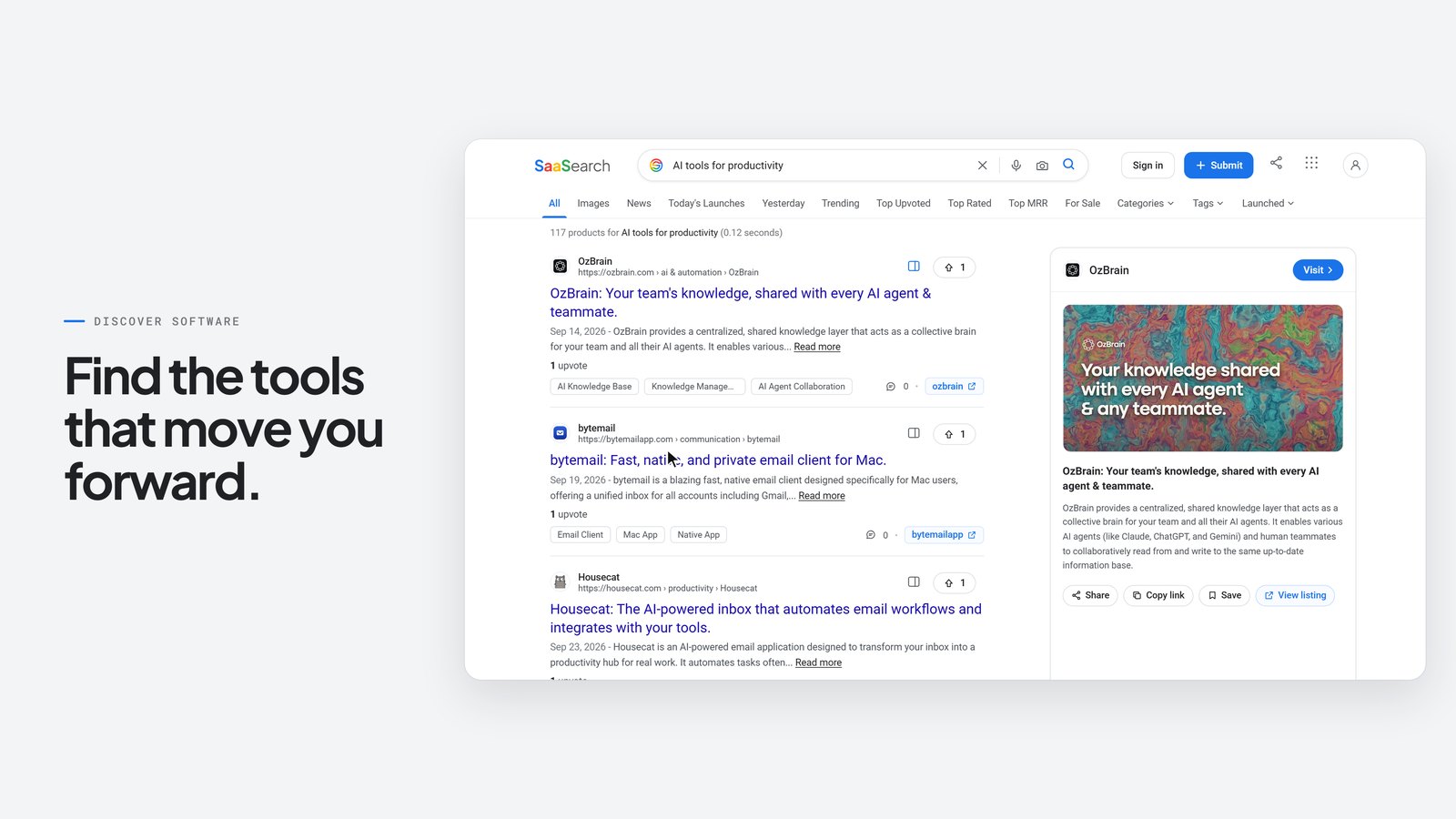
TL;DR: I gave Claude Opus 5.5 (running in Claude Code) one long creative brief and asked for a finished 30-second launch film for SaaSearch.io. It didn't generate pixels the way text-to-video models do. It researched the live website with a scripted browser and rebuilt the real interface in HTML. It animated that interface with about 1,900 lines of deterministic code, composed and synthesised an original soundtrack from the same timeline, and captured 1,800 frames at 3840×2160 with Playwright. ffmpeg then encoded them into a 60 fps MP4. Along the way it reviewed its own renders, found real problems (a state-leak bug, an overlapping animation, a placeholder image) and fixed them before the final render. Below you'll find the film, how it works, the maths, the mistakes, and a free SKILL.md you can use to do the same.
Watch the film
30 seconds · 3840×2160 master · 60 fps · original synthesised soundtrack. The 1080p web version is shown here.
🎧 Soundtrack only: saasearch-film-soundtrack.mp3
The numbers (all measured from the final files)
| Metric | Value |
|---|---|
| Duration / frames | 30.00 s · exactly 1,800 frames |
| Resolution / frame rate | 3840×2160 (4K UHD) · 60 fps |
| Video codec | H.264 High, CRF 15, BT.709 · 10.3 Mbps · 38.8 MB |
| Audio | AAC 320 kbps, 48 kHz stereo · −13.9 LUFS integrated · −1.0 dBTP true peak · LRA 3.0 LU |
| Code written | ~1,900 lines (renderer 466, components 215, timeline 107, easing 72, audio synth 284, capture 85, plus scripts) |
| Real assets pulled from the live site | 49 product images and favicons, 10 font files, 16 research screenshots |
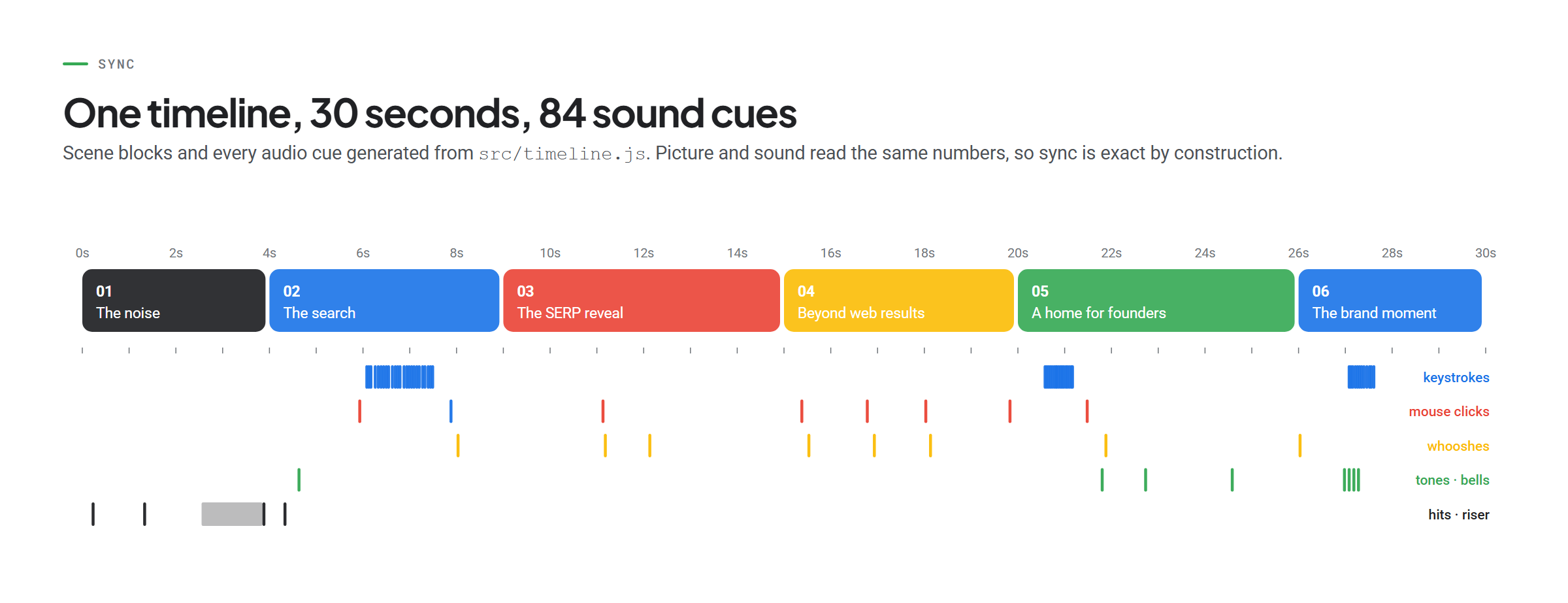
| Sound cues synced to picture | 84 (keystrokes, clicks, whooshes, tones, bells) |
| Frame capture time | 385 s for 1,800 4K frames (5 parallel browser pages ≈ 214 ms/frame) |
| Video editing software used | None. No After Effects, Premiere or DaVinci; just Node.js, Chromium and ffmpeg |
What people think AI video is vs. what Claude actually made
Most people hear "AI made a video" and picture a diffusion model dreaming up pixels from a prompt. That's not what happened here, and the difference matters.
| What people usually assume | What actually happened in this build |
|---|---|
| "Claude generated the video frames like Sora or Veo." | Claude wrote software. Chromium drew every pixel from HTML and CSS; ffmpeg encoded them. |
| "AI video is random. You can't get the same shot twice." | Every frame is a pure function of time t. I tested 15 timestamps rendered in scrambled order against fresh renders: byte-identical. |
| "The AI will invent a fake UI that looks like the product." | It drove the live saasearch.io with Playwright, typed the real query, clicked the real tabs, and rebuilt the UI from the site's own colour tokens, fonts and data. |
| "AI hallucinates numbers to make it look impressive." | The brief banned invented metrics. Every product name, date, tag and result count on screen was captured from the live site that day, or from the founder's own dashboard screenshots. |
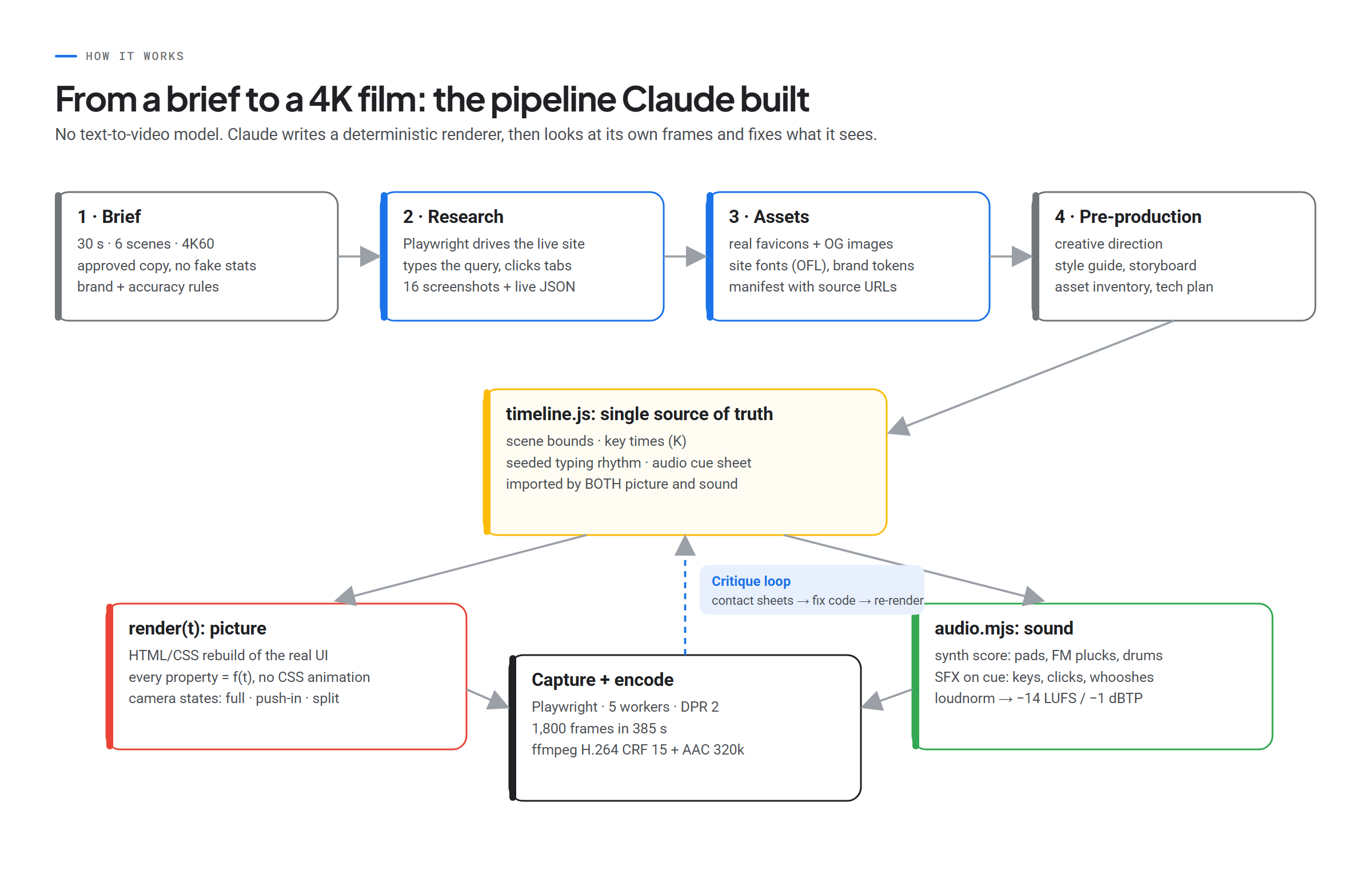
| "One prompt, one shot." | It worked like a studio: research → pre-production docs → keyframes → low-res preview → critique → fixes → final render → QC. |
| "AI can't do audio sync." | The score and SFX were synthesised from the same timeline file as the animation, so every keystroke and click lands on its frame. |
| "It's flawless." | It wasn't. It shipped a state-leak bug, an overlapping morph and a placeholder image, then caught all three itself. It also cannot hear, so the audio was verified with meters, not ears. |
| "You need a motion designer's tools." | You need a good brief, a terminal, and the patience to let it iterate. |
The short version: Claude doesn't make videos. It makes programs that make videos. That's why the result is precise, editable and reproducible: change one number in the timeline and re-render.
How does Claude Opus 5.5 actually work on a task like this?
Claude Opus 5.5 is a large language model. On its own it reads and writes text and code, and it can look at images. In Claude Code (I used the desktop app), it becomes an agent with tools: it can run shell commands, read and edit files, drive a browser, and open the images it produces.
That combination is the whole trick. The loop looks like this:
- Plan. It turns the brief into phases, a storyboard with exact timings, and a technical plan.
- Act. It writes code, runs it, installs what's missing (the ffmpeg bundled with Playwright is a stripped-down build, so it pip-installed a full one with H.264 and AAC).
- Look. It renders stills and contact sheets and views them. This is the step most people don't realise is happening.
- Critique. It writes down the worst problems with timestamps.
- Fix and repeat until the frames hold up.
When I suggested mid-task that it "take a remote session to see how the clicks and pages perform", it scripted a headless browser session on the live site. It typed the query character by character, captured the suggestions dropdown, opened the results, the details panel, Images, News, Submit and a product page, and pulled the real text and image URLs into JSON. Everything in the film is built from that capture.
The creative concept: signal from noise
The brief asked for a premium launch film, not a template explainer, with three messages: discover software, get discovered, grow your presence. Claude's concept was signal emerging from noise:
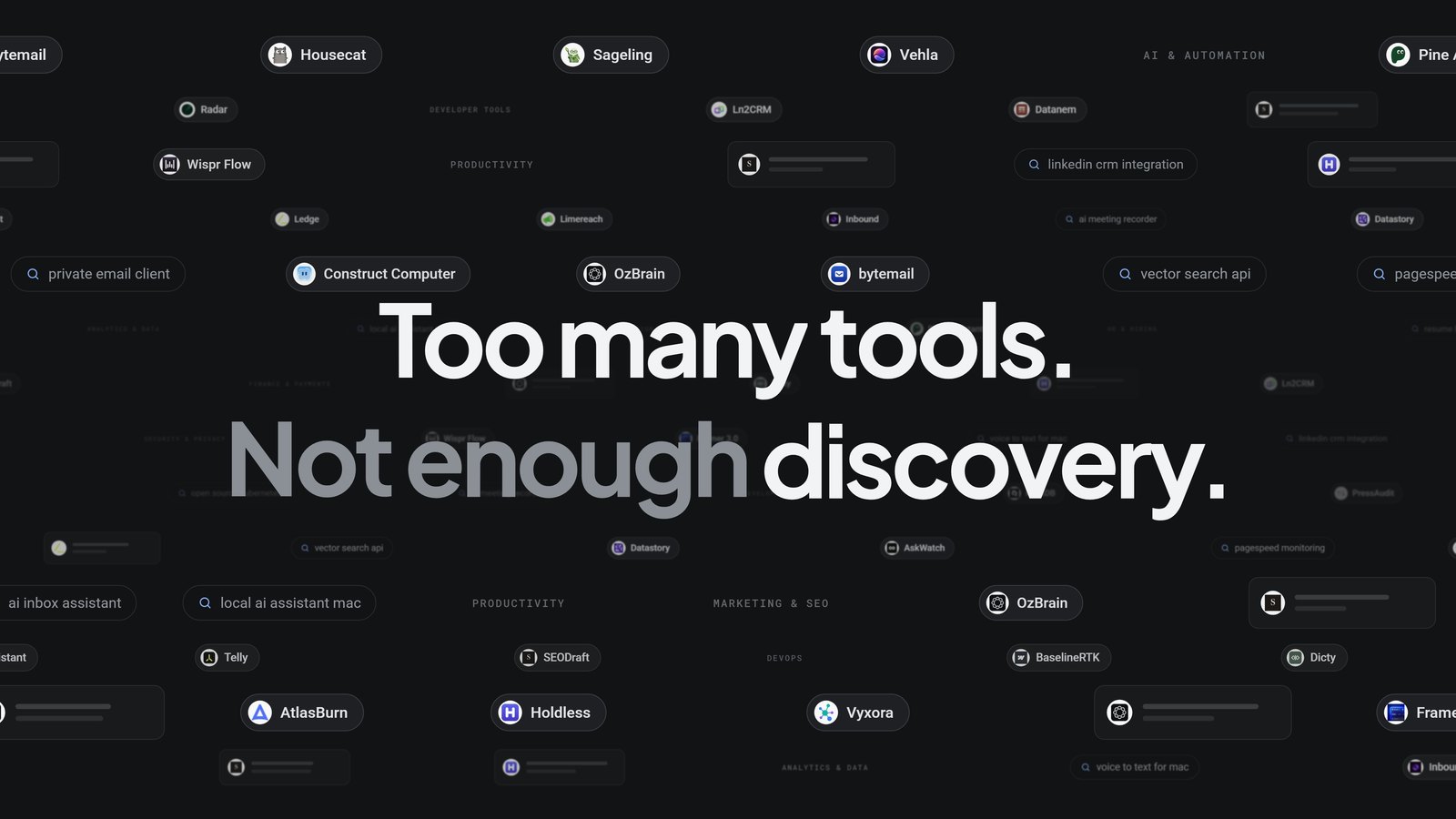
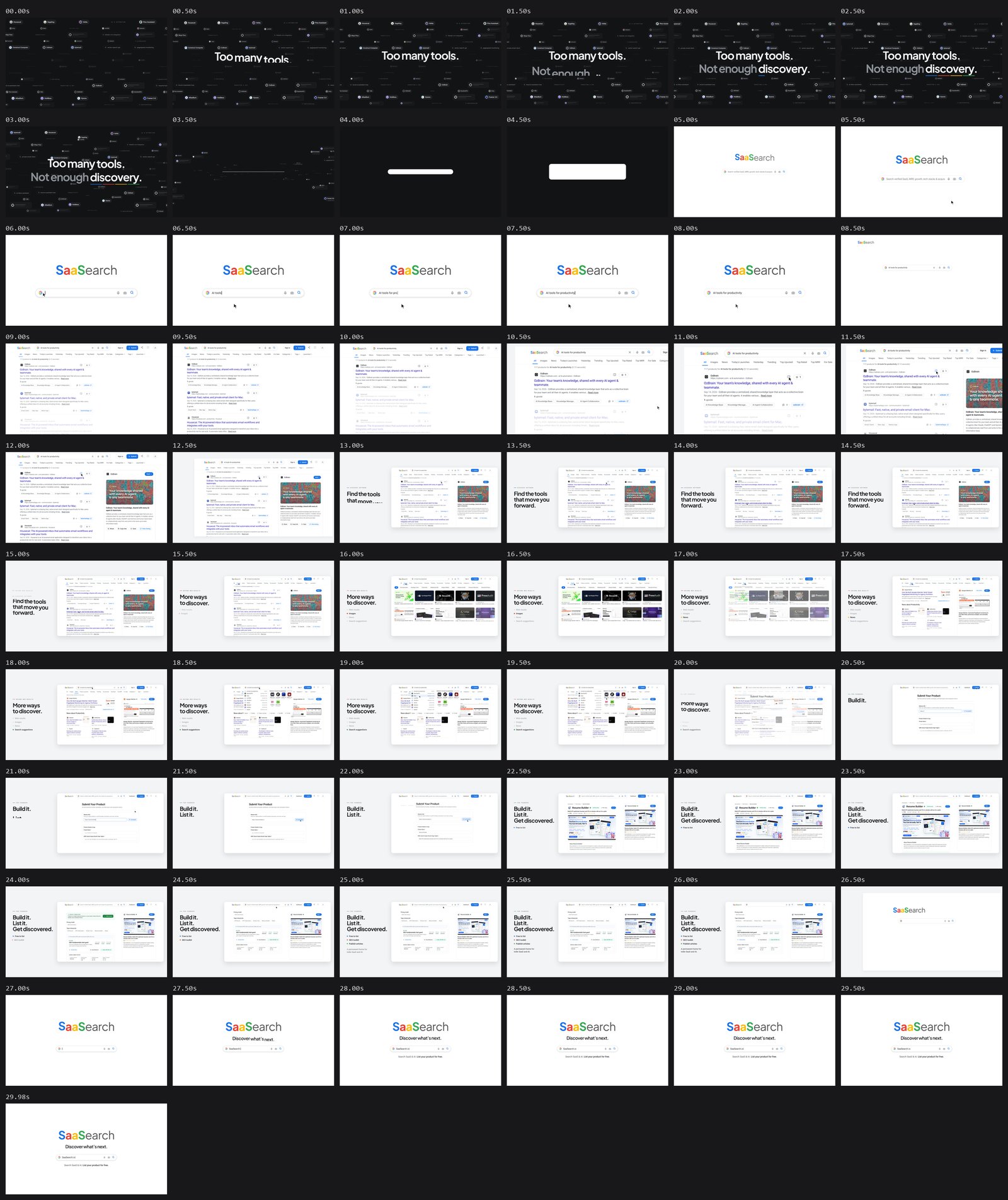
- 01 The noise (0–4 s): a drifting dark field of real product names, queries and category labels. "Too many tools. / Not enough discovery."
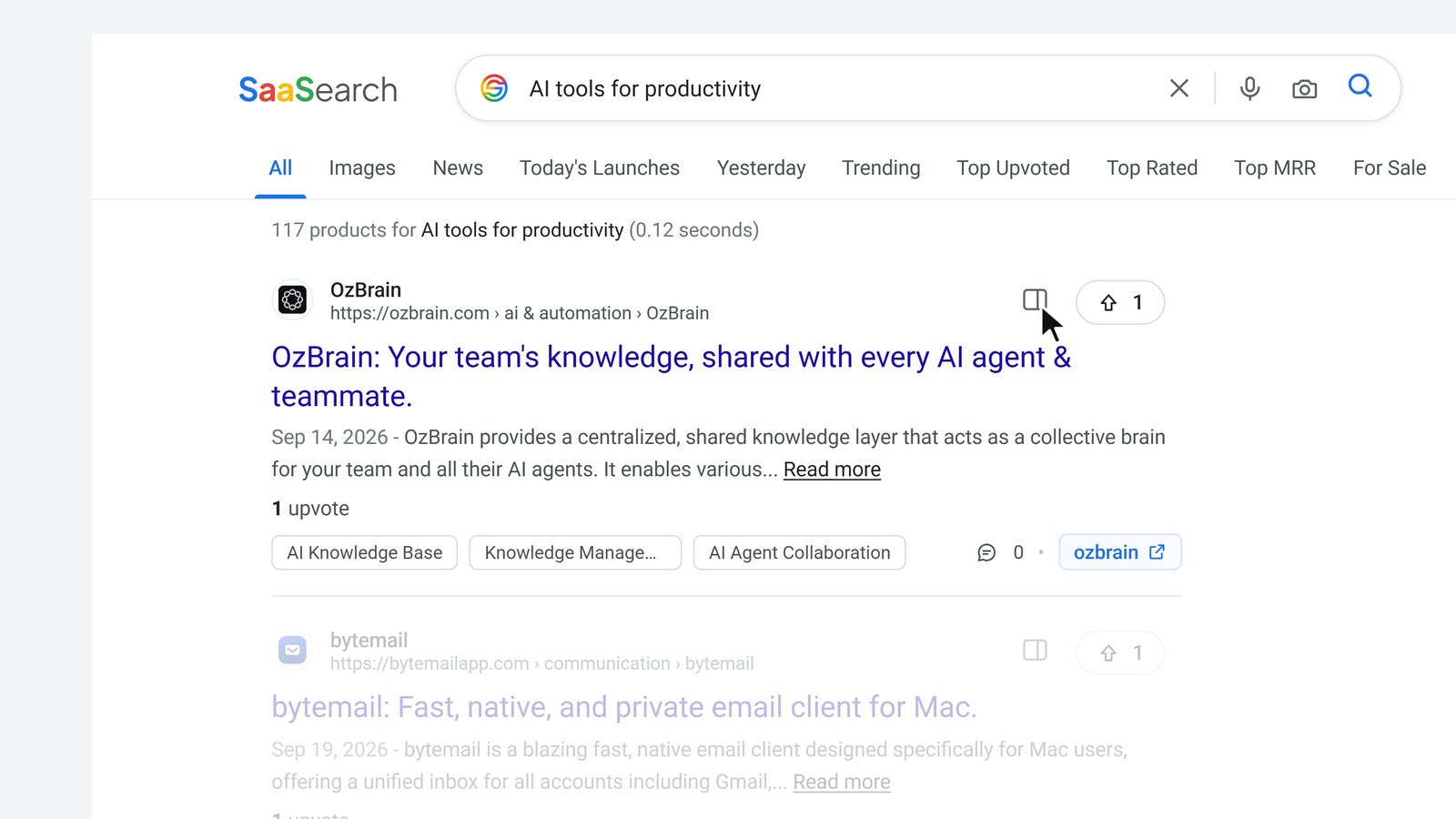
- 02 The search (4–9 s): every fragment collapses onto one line, the line becomes the search bar, and the bar expands into the page. The camera pushes in while "AI tools for productivity" is typed.
- 03 The SERP reveal (9–15 s): the real results page; push-in on the first result, a click opens its details panel, then the page steps aside: "Find the tools that move you forward."
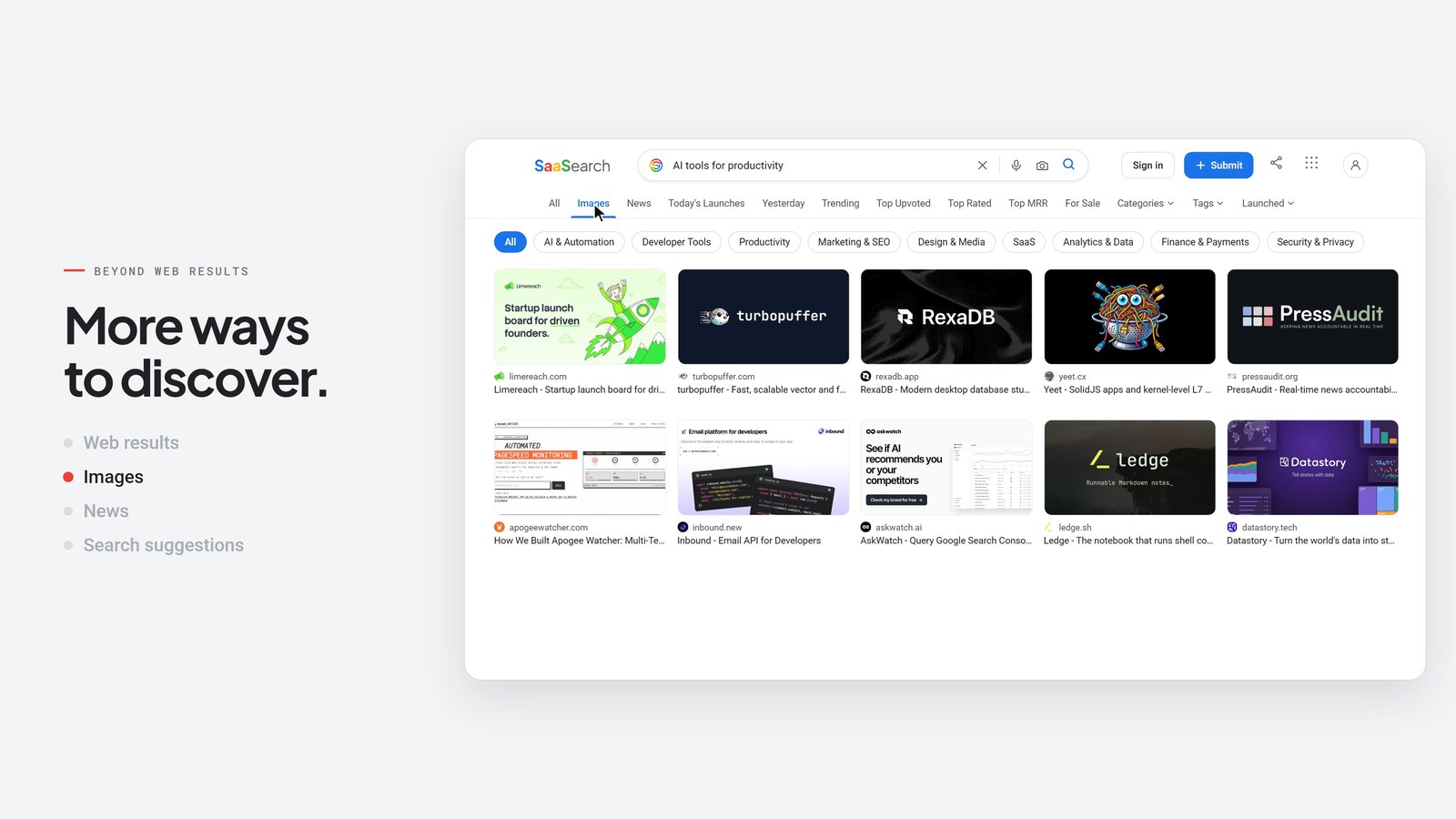
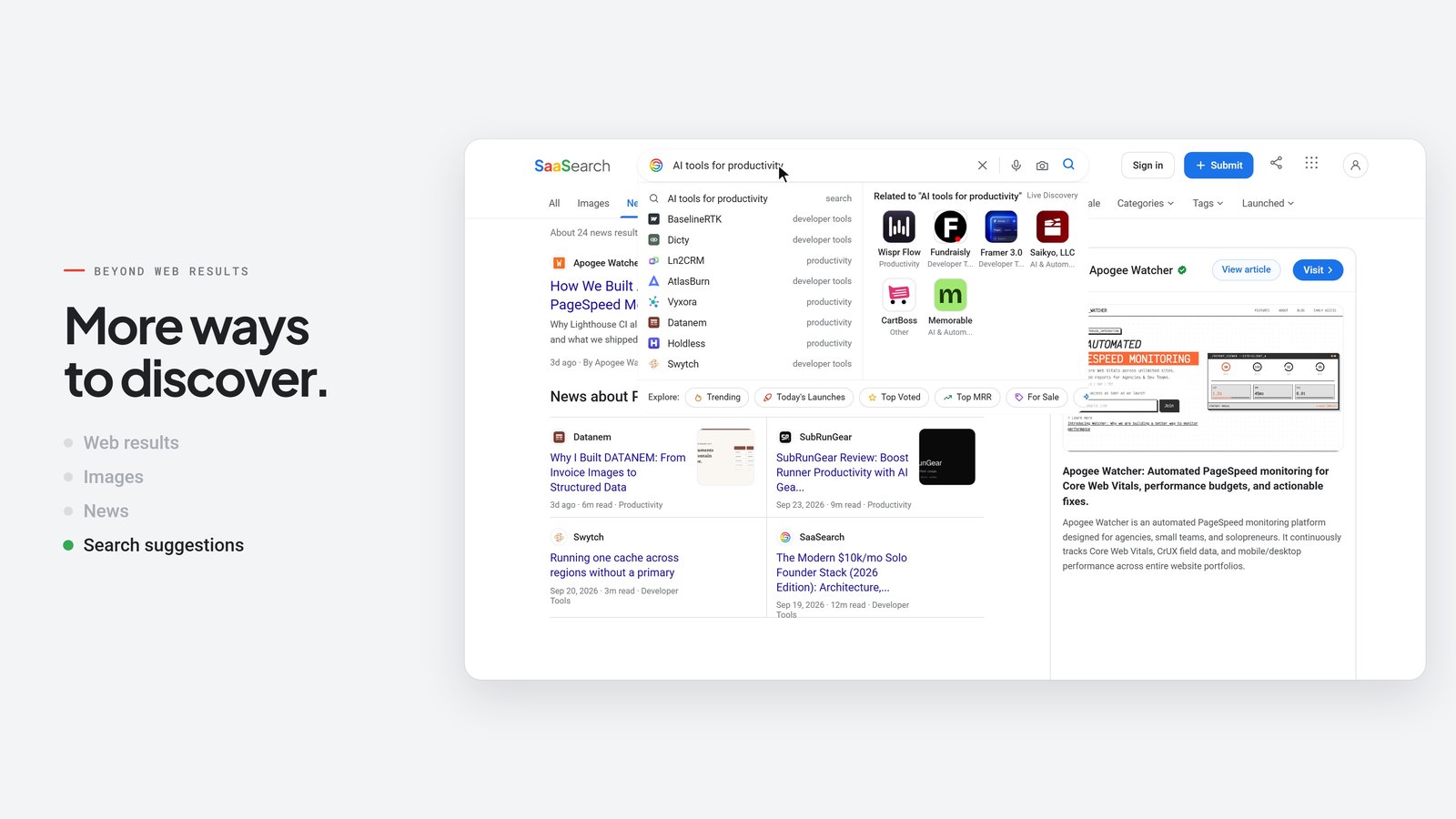
- 04 Beyond web results (15–20 s): Images → News → search suggestions, with the tab underline travelling between them.
- 05 A home for founders (20–26 s): Submit → AI Autofill → a verified product page → the founder's SEO toolkit and "Write Article". "Build it. List it. Get discovered."
- 06 The brand moment (26–30 s): everything unwinds into the opening search composition; the bar types "SaaSearch.io".
The best idea in the film is object identity: nothing just appears. Fragments become a line, the line becomes the bar, the bar becomes the page, a click becomes a panel, and the header becomes the end card.





Step-by-step: how to make a motion graphics video with Claude
This is the exact workflow, in the order it ran. The free skill at the end packages all of it.
Step 1: Write a brief that bans the usual AI failure modes
The brief was long, and that's a feature. The parts that mattered most:
- Hard specs: 30.00 s, 3840×2160, 60 fps, H.264 + AAC, every property a deterministic function of time.
- A six-scene storyboard with timings and approved copy.
- Truth rules: use the real interface; don't invent metrics, testimonials or rankings; don't imply a Google affiliation; only say "free" where it's actually free.
- An explicit list of things to avoid: purple AI gradients, random particles, glassmorphism, spinning 3D, unreadable tiny UIs.
- Mandatory review stages: keyframes, low-res preview, a critique naming the three worst problems with timestamps, fixes, then final QC.
Step 2: Research the real product with a scripted browser
Claude wrote research.mjs (Playwright) to open the live site, type the query, wait for suggestions, press Enter, and capture the results. Then it visited Images, News, About, Submit and a product page. Two practical lessons it hit and fixed:
waitUntil: 'networkidle'never resolves on a site with analytics. Use'load'plus a short delay.- Responsive sites often have a hidden duplicate search input, so target
input[name="q"]:visible.
It also read the codebase, and that's how it discovered the wordmark isn't an image at all. It's live text: Plus Jakarta Sans, "SaaS" bold in four colours, "earch" in grey. So the logo renders as vector type, razor-sharp at 4K, instead of an upscaled PNG.
Step 3: Pre-production docs before animating
It produced a creative direction, a style guide (tokens copied from globals.css, two type families, motion principles), a storyboard with times, an asset inventory separating real material from supporting graphics, and a technical plan. Writing these down first is what kept 30 seconds of animation coherent.
Step 4: Build a deterministic renderer
The core contract is one function:
window.__render = (t) => render(t); // t in seconds; sets EVERY style from t alone
No CSS animations, no timers, no Math.random(). Randomness comes from a seeded PRNG (mulberry32), so the "noise" field and the human-feeling typing rhythm are identical every render. The UI is built once, and render(t) only mutates transforms, opacity, clip-paths and text.
Step 5: Put every time in one file
timeline.js holds scene bounds, 50+ key times, and the keystroke schedules, and it exports the audio cue sheet. The renderer imports it and so does the audio synth. That's why sync is exact by construction: there's no separate audio edit to drift.
Step 6: The maths behind the motion
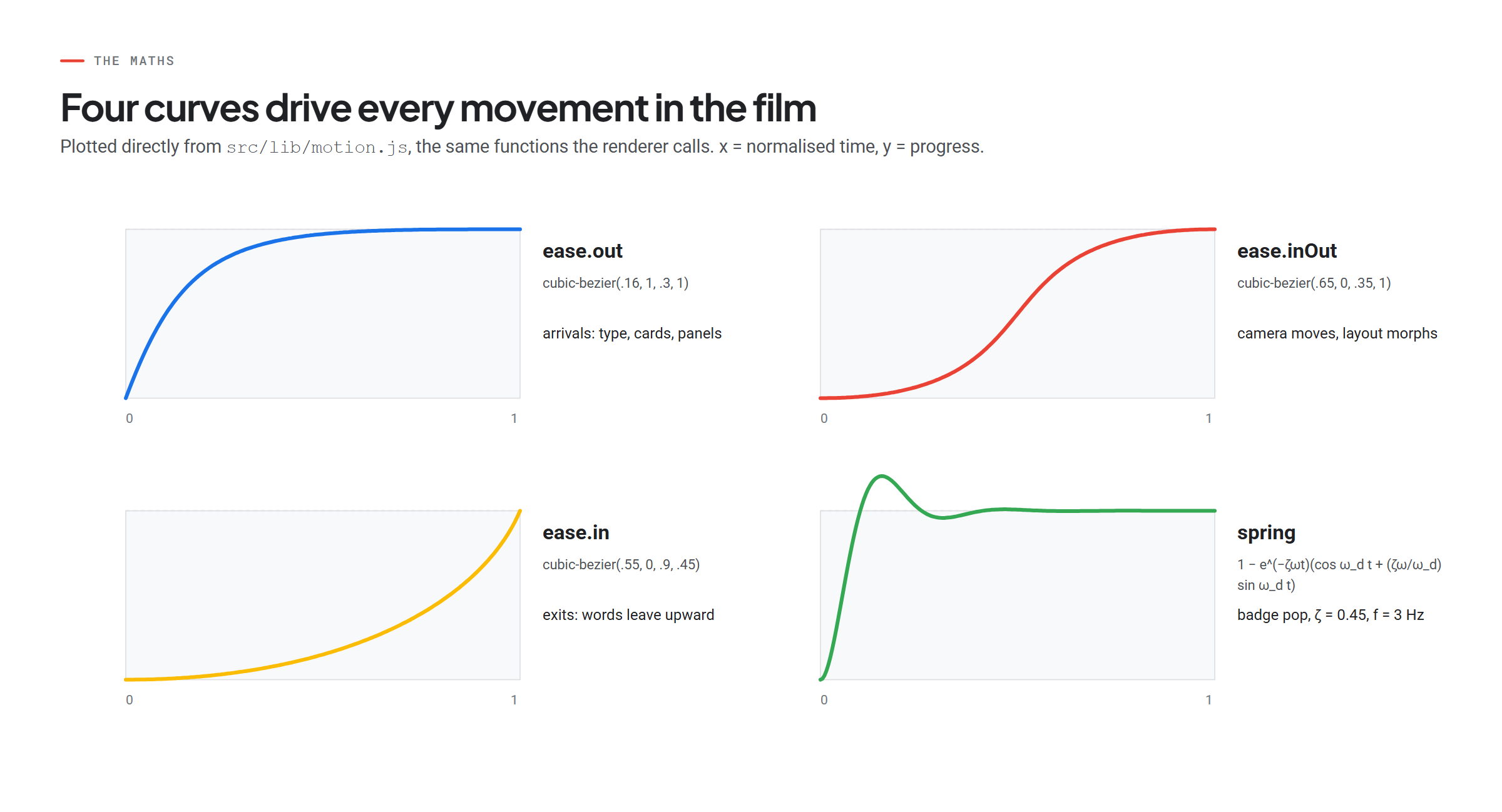
Every movement in the film comes from four curves and one camera equation.
Easing (CSS-identical cubic Bézier). For control points P1 = (x1, y1) and P2 = (x2, y2):
x(u) = 3(1−u)²u·x1 + 3(1−u)u²·x2 + u³        solve x(u) = t  (Newton's method, bisection fallback)
y(u) = 3(1−u)²u·y1 + 3(1−u)u²·y2 + u³        eased progress = y(u)

ease.out   = (.16, 1, .3, 1)    arrivals: words, cards, panels
ease.inOut = (.65, 0, .35, 1)   camera moves and layout morphs
ease.in    = (.55, 0, .9, .45)  exits
Spring (closed form, deterministic at any t):
y(t) = 1 − e^(−ζωt) · ( cos(ω_d t) + (ζω/ω_d) · sin(ω_d t) )
ω = 2πf,  ω_d = ω·√(1 − ζ²)        used with ζ = 0.45, f = 3 Hz for the "Verified" badge pop
The camera. The real UI is built at its true 1440 px width inside one element, moved by a single transform:
canvas = T + s · page
Full-bleed:   s = 1920 / 1440 = 4/3,  T = (0, 0)
Focus page point P at canvas point C:   T = C − s·P
Search push-in:  s = 2.0667 on P = (720, 333)  →  T = (−528, −148.2)
Split layout:    s = 0.88,  T = (1920 − 1440·0.88 − 40, (1080 − 810·0.88) / 2) = (612.8, 183.6)
Three states only (full, push-in, split), interpolated with ease.inOut. Limiting the camera to three states is a big part of why it feels "directed" rather than floaty.
The noise collapse. Each fragment flies to a point on the future search bar:
target_x = 960 + clamp(0.42 · (x − 960), −380, 380),   target_y = 540
start_i  = 2.55 s + 0.45 · min(1, |x − 960| / 1100) + 0.22 · seed_i     (outer fragments arrive last)
Human typing rhythm:
t[i+1] = t[i] + b · (0.75 + 0.5 · r()) + (char is space ? 0.35 · b : 0), b = 58 ms, r = seeded PRNG
Resolution and throughput: a 1920×1080 CSS viewport × deviceScaleFactor 2 = 3840×2160. 30 s × 60 fps = 1,800 frames; 385 s ÷ 1,800 ≈ 214 ms per frame across 5 workers.
Step 7: Original sound design, synthesised in code
No stock music and no samples, so there are no licensing questions. audio.mjs synthesises:
- The score: 120 BPM in D major. Dark Bm9 pads under the noise, a bright Dmaj9 bloom as the bar opens, a groove that drops on the SERP reveal at 9.0 s, a breakdown for the founder "moment of clarity", and a four-note sonic logo (D–F♯–A–D), one bell per coloured letter of the wordmark.
- The instruments: polyBLEP saw pads, FM plucks and bells, sine/saw bass, a synthesised kick that side-chains the pads, noise claps and hats, and a Schroeder-style reverb.
- SFX on cue: 84 events, including each keystroke (seeded variation), mouse clicks, whooshes on camera moves, and confirm tones.
- Mastering: a two-pass
loudnormto −14 LUFS / −1 dBTP. The result: −13.9 LUFS, −1.0 dBTP, flat factor 0 (no clipping), no unintended silences.
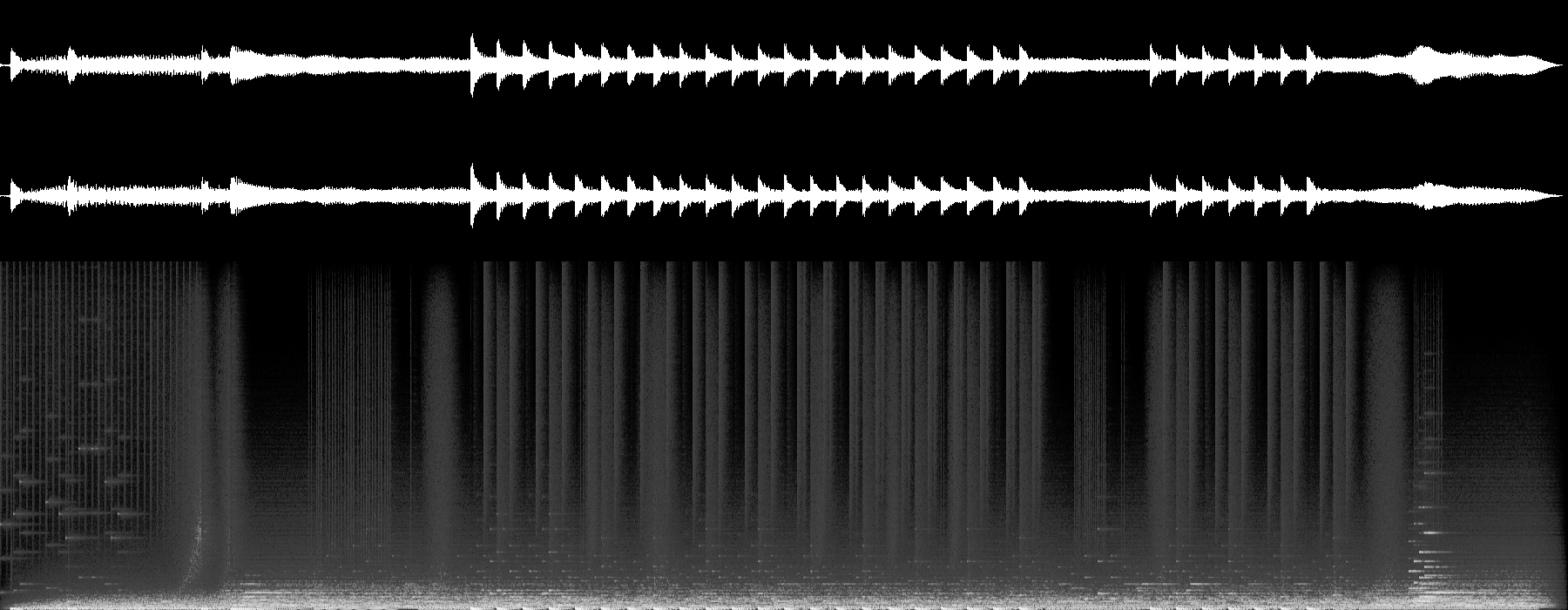
One limit: Claude can't hear. It verified the audio with loudness meters and by looking at the waveform and spectrogram, then told me to listen before publishing, which is the right call.
Step 8: Capture with Playwright, encode with ffmpeg
await page.evaluate((t) => window.__render(t), t);
await page.evaluate(() => new Promise(r => requestAnimationFrame(() => requestAnimationFrame(r))));
await page.screenshot({ path, type: 'jpeg', quality: 95, animations: 'disabled' });
ffmpeg -framerate 60 -i f_%05d.jpg -i audio_master.wav \
  -vf "scale=out_color_matrix=bt709:out_range=tv,format=yuv420p" \
  -c:v libx264 -profile:v high -preset slow -crf 15 \
  -c:a aac -b:a 320k -movflags +faststart saasearch_launch_film_4k.mp4
A 960×540 preview renders in about a minute, so iteration is cheap. Only the approved cut goes to 4K.
Step 9: The critique loop (the part that makes it good)
After the first full preview, Claude reviewed a contact sheet with a frame every half second. It named the three worst problems with timestamps, fixed them in code, and re-rendered. These are real before/after frames from that loop:
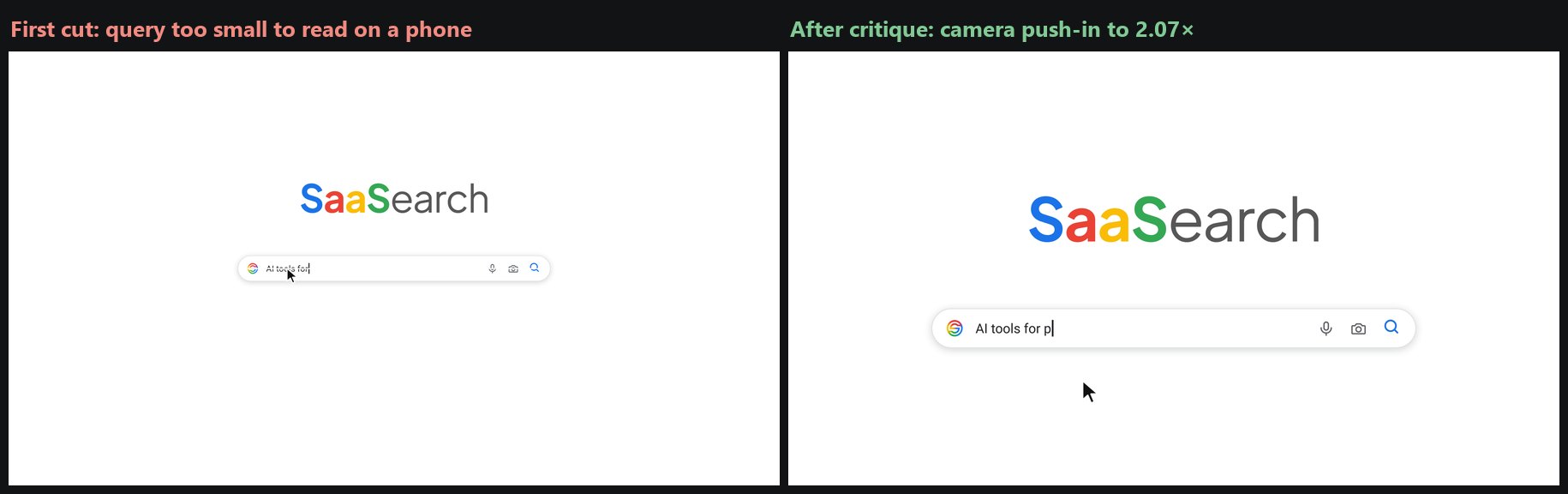
Problem 1 (5–8 s): the typed query was too small to read on a phone. Fix: a camera push-in to 2.07× while typing, released as the results page arrives.
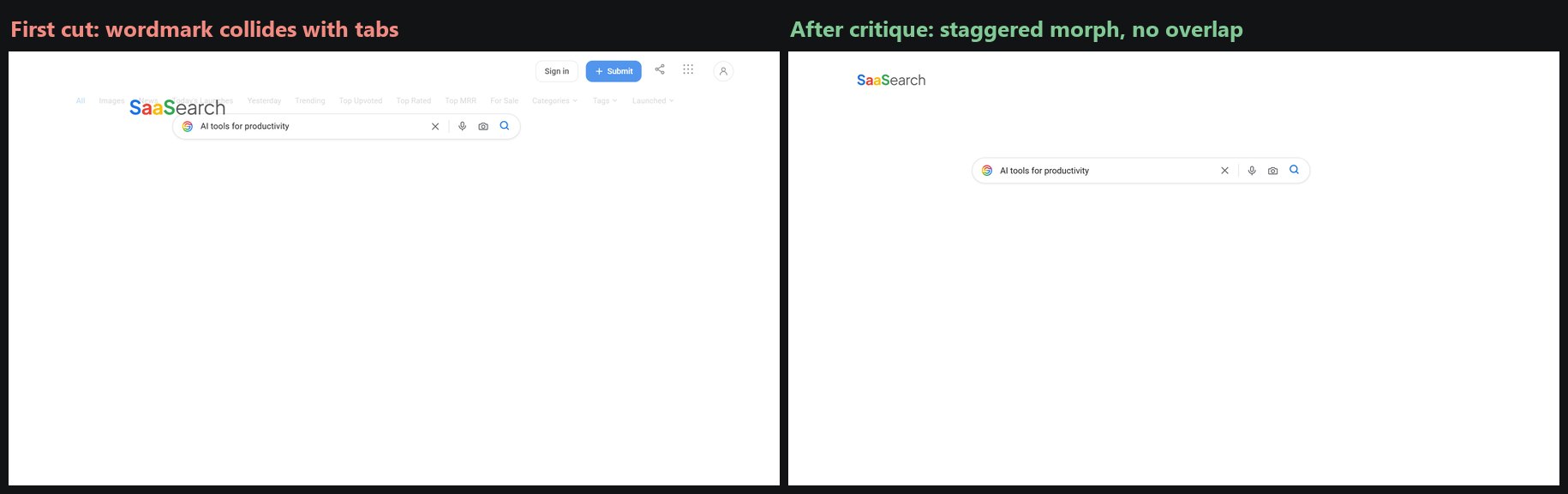
Problem 2 (8.5 s): the wordmark slid through the tabs during the header morph. Fix: the logo leads, the bar trails by 0.2 s, and the camera pulls back earlier.
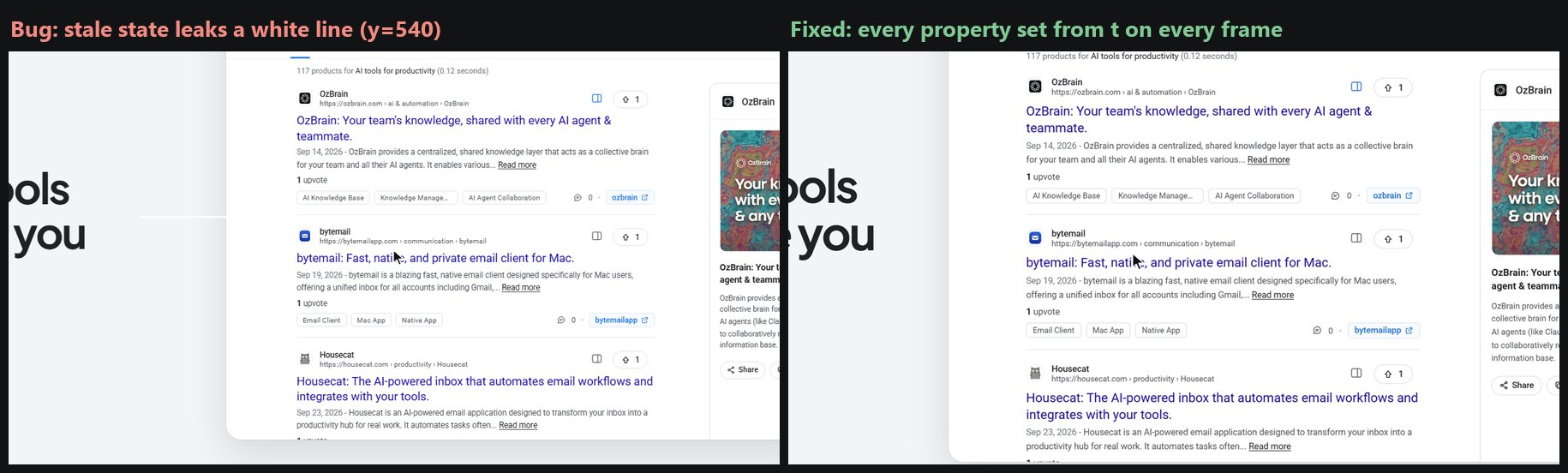
Problem 3 (any frame after 4 s): a stray white line from Scene 01 leaked into later frames. An early return skipped resetting one element, so a frame's look depended on the frame before it. Fix: set every property on every frame, plus an automated determinism test.
It also caught that one Images-tab card had a broken favicon on the live site and had been filled with a grey placeholder dot. The brief said no placeholders, so it swapped in the next real card from the same grid and re-rendered only that section.
Step 10: Final QC
Before delivery, Claude verified the duration (30.00 s), the exact frame count (1,800), resolution, fps, BT.709 colour tags (it found missing primaries and fixed them with a lossless remux), loudness and true peak. It also extracted both sides of every scene boundary to check for blank or broken frames.
The one skill: reuse this workflow with Claude
I packaged the whole method as a Claude skill: SKILL.md (product-film-motion-graphics). It encodes the rules that made this work:
- research the live product first, and use real data only
render(t)must be a pure function of time, with no early returns- one
timeline.jsfor picture and sound - three camera states, four easing curves, and mask-based type
- identity-preserving transitions, with offset morph windows so elements never collide
- a synthesised soundtrack mastered to −14 LUFS / −1 dBTP
- preview, critique (three worst problems with timestamps), fix, then the 4K render
- determinism test and final QC numbers
To install it in Claude Code: copy the folder to .claude/skills/product-film-motion-graphics/SKILL.md in your project (or ~/.claude/skills/ for every project). Claude loads it automatically when you ask for a product film.
A prompt you can paste:
Make a finished 30-second product film for https://yourproduct.com. Use the product-film-motion-graphics skill. Research the live site first and use only real UI and real data, with no invented metrics. 3840×2160, 60 fps, H.264 + AAC, original synthesised soundtrack at −14 LUFS. Six scenes: problem → search/entry point → hero feature → secondary features → founder/customer value → brand end card. Show me keyframes and a low-res preview, critique the three worst problems with timestamps, fix them, then render the final and report QC numbers.
Limits
- It's code-driven motion design, not generative footage. You won't get photoreal humans or live action. You get precise, brand-accurate interface storytelling, which is what most SaaS launch videos need.
- Claude can't listen. Audio is checked with meters and spectrograms; you should still listen before publishing.
- 4K60 encoding is slow on a laptop CPU. Capture took about 6.5 minutes; the H.264 encode took roughly 20 more. Plan for it, or encode a 1080p cut for social.
- The live data is a snapshot. Search results change; the film shows them as an illustration of a search, not a guaranteed ranking. Rotating sponsored slots were deliberately left out.
- Quality comes from the loop, not the first pass. The first cut had real problems. The critique stage is not optional.
FAQ
Can Claude Opus 5.5 make videos?
Yes, but not by generating pixels. In Claude Code it writes a program, here an HTML/CSS/JavaScript renderer, then captures frames with a headless browser and encodes them with ffmpeg into a real MP4 with audio.
Is Claude a text-to-video model like Sora or Veo?
No. Text-to-video models synthesise footage directly. Claude writes and runs code that renders footage deterministically, so the output is editable, reproducible frame by frame, and built from your real product UI and data.
What tools do you need to make a motion graphics video with Claude?
Claude Code, Node.js, Playwright (headless Chromium) and ffmpeg with libx264. Python with Pillow is optional, for contact sheets. No After Effects or video editor is required.
How long does a 30-second 4K video take to render?
In this project, capturing 1,800 frames at 3840×2160 took 385 seconds with five parallel browser pages (about 214 ms per frame). H.264 encoding at 4K on a laptop CPU took roughly another 20 minutes. A 540p preview renders in about a minute.
How does Claude keep audio in sync with the animation?
Both the animation and the audio synthesiser import the same timeline.js. Keystrokes, clicks and transitions are generated from the same timestamps that drive the visuals, so sync is exact by construction: 84 cues in this film.
Can Claude create original music for a video?
It can compose and synthesise music in code: oscillators, envelopes, filters, FM synthesis and reverb, then master it to a loudness target. It can't hear the result, so a human should listen before publishing.
Does the AI make up fake product screenshots?
Not with this workflow. The skill requires researching the live product first and using only real interface details and data. The brief explicitly banned invented metrics, testimonials and rankings.
What is a Claude skill?
A skill is a folder with a SKILL.md file that packages instructions for a specific kind of task. Claude Code loads it when a request matches its description, so a workflow like this one becomes repeatable.
Why render with HTML instead of a video tool?
HTML/CSS can reproduce a web product's real interface exactly, fonts and tokens included. Making every property a function of time turns the browser into a deterministic, scriptable motion graphics engine.
What resolution and format should a launch video be for X and LinkedIn?
Master in 3840×2160 at 60 fps, then post a 1920×1080 H.264 MP4 with AAC audio and +faststart. The 1080p cut of this film is 9.7 MB. Design it to work muted, since many people watch social video without sound.
Resources
- 🎬 Film (1080p web cut): saasearch-film-1080p.mp4
- 🎧 Soundtrack: saasearch-film-soundtrack.mp3
- 🧩 Claude skill: SKILL.md
- 🔎 The product in the film: SaaSearch.io, a search engine for indie SaaS and AI products. Listing is free.
SaaSearch.io is an independent directory, not affiliated with, endorsed by, or connected to Google LLC. Product names and images shown in the film belong to their respective owners and appear as they do in SaaSearch results.
About the author: Billal is a solo founder and the builder of SaaSearch.io. He writes about shipping indie products and using AI agents to do work that used to need a studio. Follow him on X at @billalb4u.